if you feel bore and want to relax
Enjoy www.afcgame.com

Showing posts with label SMS. Show all posts

Wednesday, January 26, 2011

Sms Manager v1.00

Sms Manager v1.00 | Read more...
Price: free

Description
Sms Manager allows one to send Flash Messages (Directly pops up on screen , Number is displayed Anonymous on some phones ) , Group Messaging (Sending sms to multiple Contacts at once) , Sms Flooding (Sending a message multiple times automatically). It is very easy to use with a very simple UI.

It maintains CSV files for the groups so its very easy to create/modify groups from computer also.
Go Get it and have some fun...
If you encounter any bugs then Please report it via Bug Reporter inside it so that it can be fixed .
Note: Sms Manager uses your network message tariff, It do not require internet to work.

Saturday, October 16, 2010

WMkits SMS Encryption v2.1

WMkits SMS Encryption v2.1 | Read more...
Description
WMkits SMS Encryption is a professional text messages encryption software for Windows Mobile phones. It can encrypt and hide the SMS messages (including existing SMS messages and future incoming/outgoing SMS messages) on your windows mobile device. The hidden SMS messages are encrypted and stored separately

Encrypt and hide all existing sms on your file folders, including SMS default folders (Inbox, Outbox, Drafts, Deleted, Sent) and custom folders.
Encrypt and hide future incoming SMS and outgoing SMS in real time.
Multible encryption modes available. By settings, you can choose to encrypt sent sms, received sms, sms from/to your wanted contact(s) or all sms.
Utilize AES 128-bit encryption. Passwords will be private, encrypted and saved.
Powerful SMS management. WMkits SMS Encryption supports threading mode of your encrypted messages and Page Views. Besides, you can use it to directly reply, copy, forward or delete sms exactly the same as on your phone.
Safely and easily decrypt sms. You can choose to decrypt your sms by settings.
Able to decrypt and transfer sms onto your new windows mobile phone.
Have a large memory for sms. SMS backup and restore functions supported. No need to worry about any loss of your encrypted sms.
Your login password and encrypted sms are safely kept even if you uninstall this software.
Easy and safe to install/uninstall.
Simple and intuitive Interface.
Compatible for all windows mobile (Pocket PC) phones.

Requirements : WM5-WM6.5

Aiko Solutions SecuWipe v1.1

Aiko Solutions SecuWipe v1.1 | Read more...
Serial: Register with any key

Description
SecuWipe is data wiping tool that irretrievably erases data on your mobile device. It can be set up to wipe the data automatically on soft reset, on SMS or under a host of other conditions.

SecuWipe is an advanced data wiping solution that completely removes all traces of sensitive information from Windows phones and Pocket PCs - remotely and locally, manually and automatically. It is a flexible tool that can become your last shield when the device gets into intruder's hands.
SecuWipe will securely wipe all mobile device space including:
•Contacts, Calls
•SMS, MMS messages
•Email messages and accounts
•Notes, Recordings, Appointments, Tasks
•Internet Cache, Cookies and History
•Free Space
•SD card(s)
•Files and Folders

Version 1.1
New features:
1. Added Wipe Sheduler with remote wipe via SMS, Untrusted SIM wipe, Time-based wiping, Soft-Reset wiping
2. Added Command line support
3. System files can not be wiped
4. Added SD card formatting
5. Added Recycle Bin wiping for Windows CE (via Custom Wipe)
Fixed bugs:
1. Fixed issues with 800x480 screen
2. Improved behavior when wiping "root" of the device

Requirements : WM5-WM6.5

Friday, October 1, 2010

MoblMsg 2.0 Group SMS Lite v2.04

MoblMsg 2.0 Group SMS Lite v2.04 | Read more...
Price: Free

Description
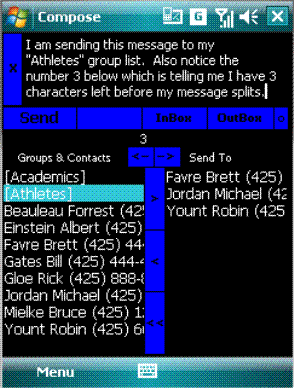
MoblMsg is an application written for Smart Phones & devices running the Windows Mobile operating system. It sends and receives SMS text messages. Its compact design makes it quicker, and easier to use than the Windows Mobile native SMS Text Messaging application.

Features
  • Uses your device's existing contacts list. Your contacts with a phone number in the "Mobile" category will automatically appear in MoblMsg.
  • Simple interface. Everything you need is in one simple window. Switch from Inbox to Outbox to Compose with a click of a button.
  • No more endless scrolling through your list of contacts. The MoblMsg contact list is limited to only those people you can send a text message to which makes scrolling for a person very quick.
  • Slider bar lets you expand the bottom windows to get a full view of your contact or "sent to" lists.
  • Quick and Easy Group list creation. Just select the names and save as a group. The groups you created are displayed at the top of your contacts list for easy retrieval.
  • You may exclude or add persons before sending a message to a Group list. The WM resident SMS requires that you send messages to the entire group and you can't exclude anyone.
  • Call anyone in your MoblMsg contacts list with just a couple clicks. Respond to a message with a phone call by clicking a button.
  • Many different color combinations to choose from. Customize the look of your MoblMsg.
  • Many different sound notifications to choose from. Choose from 20 different sounds or add your own sounds.
  • Message Length Counter shows you how many characters you have left to type before your message will be split and sent as two messages.
  • Elegant Message Splitting Outgoing messages that are split won't be split in the middle of a word.
  • Canned Replies- Choose from a list of pre programmed replies and save yourself some typing.

    Requirements
  • Windows Mobile OS 5.x or 6.x
  • 1250 KB free disk space for program installation.
  • 2 MB free RAM recommended.
  • MS Outlook Address Book installed on device.
  • VGA and standard resolutions.
  • Designed for use in Vertical Mode but can be used in Horizontal mode.
  • MoblMsg uses your device’s Outlook Address Book for names and phone numbers.
  • In order for a contact to appear in MoblMsg’s list of contacts, the phone number must be listed in the MOBILE category. If a number appears in the WORK or HOME category, for example, it will not appear in MoblMsg.
  • For best results, phone numbers must be preceded with the Area Code.
  • Thursday, August 5, 2010

    MoblMsg 2.0 Group SMS Lite v2.01

    MoblMsg 2.0 Group SMS Lite v2.01 | Read more...
    Description

    MoblMsg is an application written for Smart Phones & devices running the Windows Mobile operating system. It sends and receives SMS text messages. Its compact design makes it quicker, and easier to use than the Windows Mobile native SMS Text Messaging application.

    Features
  • Uses your device's existing contacts list. Your contacts with a phone number in the "Mobile" category will automatically appear in MoblMsg.
  • Simple interface. Everything you need is in one simple window. Switch from Inbox to Outbox to Compose with a click of a button.
  • No more endless scrolling through your list of contacts. The MoblMsg contact list is limited to only those people you can send a text message to which makes scrolling for a person very quick.
  • Slider bar lets you expand the bottom windows to get a full view of your contact or "sent to" lists.
  • Quick and Easy Group list creation. Just select the names and save as a group. The groups you created are displayed at the top of your contacts list for easy retrieval.
  • You may exclude or add persons before sending a message to a Group list. The WM resident SMS requires that you send messages to the entire group and you can't exclude anyone.
  • Call anyone in your MoblMsg contacts list with just a couple clicks. Respond to a message with a phone call by clicking a button.
  • Many different color combinations to choose from. Customize the look of your MoblMsg.
  • Many different sound notifications to choose from. Choose from 20 different sounds or add your own sounds.
  • Message Length Counter shows you how many characters you have left to type before your message will be split and sent as two messages.
  • Elegant Message Splitting Outgoing messages that are split won't be split in the middle of a word.
  • Canned Replies- Choose from a list of pre programmed replies and save yourself some typing.

    Requirements
  • Windows Mobile OS 5.x or 6.x
  • 1250 KB free disk space for program installation.
  • 2 MB free RAM recommended.
  • MS Outlook Address Book installed on device.
  • VGA and standard resolutions.
  • Designed for use in Vertical Mode but can be used in Horizontal mode.
  • MoblMsg uses your device’s Outlook Address Book for names and phone numbers.
  • In order for a contact to appear in MoblMsg’s list of contacts, the phone number must be listed in the MOBILE category. If a number appears in the WORK or HOME category, for example, it will not appear in MoblMsg.
  • For best results, phone numbers must be preceded with the Area Code.
  • Sunday, July 25, 2010

    zhiing v2.00

    zhiing v2.00 | Read more...
    Price: Free

    Description
    zhiing is a location messaging tool that allows you to share your location, or other locations of interest, with your friends, family or co-workers. Even update your location on your favorite social network! Forget about map printouts or scribbling down directions....just zhiing the location! Simply enter the mobile number or email you want to zhiing, and press send. Your buddy receives your message and a dynamic map showing turn-by-turn directions to where you are located, or where you want to meet. Your buddy can respond with his or her location, or forward your location to others that are joining you! With zhiing you can send directions to anyone, anytime, over any network without a hassle. You can even communicate your location to people that don't have zhiing - as long as they have a cell phone or email address. "It's a big world, don't get lost."

    Tuesday, May 4, 2010

    PhoneAlarm Pro 2.40

    Price: Free
    Language: English

    Description
    phoneAlarm is a Today screen plugin - giving you total control over your Pocket PC Phone. Never miss an important call, SMS or Email again. Automatically switch profiles and quickly access Inbox, call history and control the state of bluetooth directly from the Today screen. Optimised for one-handed and in-car use.

    Requirement:
    WM5, 6.5

    Monday, April 19, 2010

    SMSSyncUp 0.60

    License: Free
    Price: Free

    Description
    SMSSyncUp help you to sync up/backup your smses to your gmail account. From your device.

    Steps to use it.

    1. Install it
    2. Choose your Gmail Account.
    3. Open the application, and fill the Send To: with the gmail id to which you want to backup sms.
    4. Go to Menu "Login"(it is not an actual login, you need to configure your Gmail account for it).
    5. Login should enable the SMS folders dropdown with all your SMS folders.
    6. Select the folder to backup.
    7. Go to Menu "Sync SMS Folder". This should start the message conversion to mail format. Progress will be displayed.
    8. On completion it will prompt and then ask you if you want to sync.
    9. Syncing would send Emails with Subject IMAPSMS| :Sender and the body will contain Message and time, the subject should help you to create proper rules in your gmail account.

    Requirements:
    Windows Mobile Pocket PC 5 , 6 , 6.1, .NetCF 3.5

    Saturday, April 17, 2010

    Azurea v1.10

    License: Free
    Price: Free

    Description
    Azurea is a simple Twitter client for Windows Mobile devices. It features tree like reply views, finger friendly scrolling, light memory usage and much more !

    Menu bar functions
    (from left to right)
    * Timeline
    * Replies
    * DirectMessages
    * Other views
    * Other menu

    "Other views" show specific User timelines, my Favorites, Following and so on.
    Favorites Change view to My Favorites
    Lists Change view to Lists / Retrieve Lists.
    Following Change view to Following.
    Followers Change view to Followers.
    Search Search timelines by Official search API.
    User Change view to UserTimeline.
    Match Create regular-expression match view.
    Close Clsoe the current showing Search, User and Match view.

    "Other menu" turn on/off the Auto reload and so on.
    Auto refresh Auto refresh the timeline.
    Enable geotagging Append geo-tag to Tweet
    Account config Show account setting dialog.
    UI config Sow user interface setting dialog.
    OAuth login Re-retrieve OAuth token when if change user id.
    API limit status Show api limit status.
    About Azurea Show version information.
    Exit Exit Azurea

    Requirements:
    Windows Mobile Pocket PC 5 , 6

    Sunday, April 11, 2010

    Mass SMS v1.0

    License: Free
    Price: Free

    Description
    SMS sender application, which allow to easely pick-up contacts from phone's database and send them a message text (SMS).

    The SMS text is automatically retrieved from clipboard. It send SMS only to mobile numbers, not car numbers, pager numbers, a.s.o.

    Note:
    The QVGA is tested only on a VGA phone; any suggestion is welcomed.

    Requirements:
    PPC WM5, WM6

    Saturday, April 10, 2010

    Vibro 1.10

    License: free
    Price: free

    Description
    I have wrote a Program to change the vibration pattern for incoming Calls, SMS and E-Mail.!!!

    Use this tool at your own risk !!!

    Feature:
    - Two separate Programms.One EXE for Configuration (VibroCFG) and one EXE for notification (Vibro).
    - Multilanguage
    - separately config Phone, SMS and EMail
    - Vibration pattern set for Phone, SMS and EMail separately
    - SMS and EMail vibration set in lengths in different
    - Alternate SMS interception
    - In what will be Profiel Vibrates
    - Choose a Vibrator
    - Cab-File that install the Programm

    How To...
    - Install the CAB on the Device
    - Run VIBROCFG.EXE
    - Setup Pattern -> Vibrate,Break,Vibrate,Break in ms
    - Setup Profile -> In what is to be vibrated Profile (You can see the active Profile in your Phone, under the Profilesettings)
    - Setup Vibrator-Nr -> Which vibrator works vibrate. Mostly the highest number.
    - Configure SMS,EMail
    - Press Exit in the Menu and the Programm Save the INI and Start the VIBRO.EXE
    - When you reset you device. Vibro.Exe is in the Startup, so it runs automticly.(After you have Phoneservice)

    Requirements:
    Windows Mobile Pocket PC 5 , 6 , 6.1, 6.5
    .NET Compact Framework 2.0

    Sunday, March 28, 2010

    MSentinel 2.60

    License: Free
    Price: Free

    Description
    MSentinel
    checks for any:
    - missed calls,
    - unread SMS/MMS,
    - unread emails
    - missed voice mails
    - 'missed' tasks and calendar reminders, and notifies about that by sound and/or vibration.

    You can specify the time period of checking, time when the sound should be played (I don't want to be disturbed at night). You can also decide if the screen should be switched off after notification.
    From the version 2.2 you can decide if the notification should be executed when the devices is 'full ON'.

    After checking application leaves the device in the state that was before checking (if it was 'on' state - it will be the same after checking; if it was 'stand by' state - it will be the same after checking).

    Language: Polish, English, Russian, German
    If you want to add a new translation you can make a copy of 'English.lng' file, rename it to 'YourLanguageName.lng' and edit the strings. Save it using UTF-8 charset.

    Requirements:
    Windows Mobile Pocket PC 5, 6+, QVGA support

    Sunday, March 21, 2010

    XBLOCKR v1.00

    License: Free
    Price: Free

    Description
    XBLOCKR is a mobile phone application designed to protect your privacy from unwanted calls. XBLOCKR has all the options that will help you screen the caller on the fly when the call arrives. It also helps you avoid unwanted calls or calls that you do not want to answer with great ease.

    You can DUCK, DROP or DIVERT calls you do not wish to answer. This app DOES NOT work with CDMA phones.

    Product Features:
    Duck - disconnects the call. If voice mail box is configured then the caller reaches your voice mail box or the caller hears an automated message depending on the operator.

    Duck & SMS - disconnects the call and sends a pre configured SMS to the caller.

    Drop - the call gets automatically picked up for a fraction of second and gets disconnected instantly. The behavior is just like how the caller feels when there is a network error.

    Requirements:
    Windows Mobile Pocket PC 6.0, 6.1 and 6.5

    Wednesday, March 3, 2010

    VITO SMS Chat 1.25

    License: Free
    Price: Free

    Description
    SMS-Chat is an SMS messenger that organizes SMS correspondence into threaded SMS conversations. This way you have a separate chat for every contact with whom you exchange short text messages like in IM programs. Multiple sms sending, templates, call back, clickable links.

    Using SMS on a Windows Mobile device can be annoying because the messages aren't threaded. This is a feature that we've hoped Microsoft would have included by now, but they haven't. VITO Technology has recently released a solution for those of us that crave IM-like SMS conversations as found in other operating systems. Is SMS-Chat just a novelty, or does it make SMS much more usable? Read on to see!

    The hot factor for this application is that it threads the messages together. It is not as sophisticated as other applications that thread messages such as Extreme Text on the Motorola Q, however SMS-Chat works with the operating system rather than the make of phone, so it has more usability despite being a less sophisticated product. There is certainly room for development as you'll see soon.

    Main Features:
    • Templates for quick answers
    • Forward, resend or delete messages
    • Active links and phone numbers, onscreen alerts
    • Multiple sms sending

    Requirements:
    WM5.0, WM6.x

    Saturday, February 27, 2010

    MiniSMSServer 0.50

    License: Free
    Price: Free

    Description
    A mini custom webserver which allows you to access all your contacts over internet. and story doesn't stop here, you can send sms to selected contact from the rendered webpage. The SMS will be sent through your mobile
    Now you can fetch the SMS from your device to the webpage.
    So now both read and write are possible
    Use:
    You can access your contacts over the Internet, send messages to them remotely from your mobile.
    In case you forget your mobile at home and app is not running Don't worry just send "Start Server" and it will respond to your command So then just access the website and all your contacts are in front of you and the Power to SMS them.
    Worried about your battery. Kill the battery sucker from the webpage
    Ok enough of description now the setup part.
    1. Download the cab and install it.
    2. Look for SMS Server CP and open it.
    3. The app is simple but has some settings, we will now see those.
    Port Number: default is 5050, this will be used to connect to your device from

    Requirements:
    Windows Mobile Pocket PC 5 , 6 , 6.1, .Net CF 3.5

    Friday, February 26, 2010

    SMS Filter Rules v4.50

    License: Free
    Price: Free

    Description
    SMSRules is an app developed with help of open source project MAPIDotNet . This app basically is used for creating filtering rules for SMSes in the SMS INBOX. This app has several features like: Moving, Copying, Deleting or Hiding a SMS. Option to create rules on user or a text in the sms body Can view and delete rules. Can create or delete folder in SMS account Auto run for individual rules or option to run all rules whenever user wants, by running an exe. Simple Deployment. works from storage Card.
    New Features:

    NEW IN 4.3
    If 4.2 is installed please first un-check autorun.
    1. Horizontal ScrollBar added to add contact list.
    2. New Tab added (Tools), gives option to Archive selected folders. Archiving will move all the messages from the selected folders to the ArchivedSMS folder and create a subdirectory tree with same name as of the source folder and under that will create folders datewise.Eg
    ArchivedSMS->Inbox->Inbox_160110
    Tools tab also provides another option to run the rules over any subfolders.
    Select the folder from the dropdown list and then apply rules.
    3. New shortcut added in program menu with name "Private SMS" which enables you to access your private folder directly.
    4. The time for which wait cursor was getting displayed when a SMS is intersepted, has been reduced.
    5. While changing the password from the main application it asks for the new password two times to confirm.
    6. Enabling/Disabling Autorun changes the way the New Text Message is notified. Now this will change the sound and notification settings.
    For FAQ s and updates Visit this link
    http://forum.xda-developers.com/showpost.php?p=4882734&postcount;=1

    Requirements:
    Windows Mobile Pocket PC 5 , 6 , 6.1. .net 3.5, password protection, inbox, Archiving

    SMSSyncUp 0.40

    License: Free
    Price: Free

    Description
    SMSSyncUp help you to sync up/backup your smses to your gmail account. From your device.

    Steps to use it.

    1. Install it
    2. Choose your Gmail Account.
    3. Open the application, and fill the Send To: with the gmail id to which you want to backup sms.
    4. Go to Menu "Login"(it is not an actual login, you need to configure your Gmail account for it).
    5. Login should enable the SMS folders dropdown with all your SMS folders.
    6. Select the folder to backup.
    7. Go to Menu "Sync SMS Folder". This should start the message conversion to mail format. Progress will be displayed.
    8. On completion it will prompt and then ask you if you want to sync.
    9. Syncing would send Emails with Subject IMAPSMS| :Sender and the body will contain Message and time, the subject should help you to create proper rules in your gmail account.

    Requirements:
    Windows Mobile Pocket PC 5 , 6 , 6.1, .NetCF 3.5

    BirthdaysSMS 1.00

    License: Free
    Price: Free

    Description
    This application can be a savior if you forget to wish your contacts on their birthdays. It will just do it for you, by automatically sending an SMS. Just have the birthday field in your outlook contacts filled rest it will do automatically. just run it once and forget, it will take the dates from contacts and set reminders in your calendar and thats not all. you can let the app check for birthdays at a scheduled time like every day 12.00 AM. and thaz it. So everyday your device will wake up for you and check if any b'days are there and if it is there it will send an SMS to that contact and that SMS you can configure. So thaz it set it forget it. New Update fixes some bugs and crashes. If you are using the earlier app please download Clean.zip and extract the Clean.exe first that will remove the bday entries made by this application.

    Requirements:
    Windows Mobile Pocket PC 5 , 6 , 6.1, .NET CF3.5

    Wednesday, February 3, 2010

    SMSSyncUp 0.10

    License: Free
    Price: Free


    Description

    SMSSyncUp help you to sync up/backup your smses to your gmail account. From your device.

    Steps to use it.

    1. Install it
    2. Choose your Gmail Account.
    3. Open the application, and fill the Send To: with the gmail id to which you want to backup sms.
    4. Go to Menu "Login"(it is not an actual login, you need to configure your Gmail account for it).
    5. Login should enable the SMS folders dropdown with all your SMS folders.
    6. Select the folder to backup.
    7. Go to Menu "Sync SMS Folder". This should start the message conversion to mail format. Progress will be displayed.
    8. On completion it will prompt and then ask you if you want to sync.
    9. Syncing would send Emails with Subject IMAPSMS| :Sender and the body will contain Message and time, the subject should help you to create proper rules in your gmail account.

    Requirements:
    Windows Mobile Pocket PC 5 , 6 , 6.1, .NetCF 3.5

    Tuesday, February 2, 2010

    zhiing - Location Messaging for Everyone 1.20

    License: Free
    Price: Free

    Description
    Forget about map printouts or scribbling down directions....use zhiing!
    Simply enter the mobile number you want to zhiing and hit send. Your zhiing buddy receives not only your text message (with up to 25x more message space than an SMS), but a dynamic map showing turn-by-turn directions of where you're at, or where want to meet!

    zhiing gives you 100% control of your location, 100% of the time.
    Best of all, the zhiing application and services are free (standard data and messaging charges for the receiver's mobile carrier may apply.) Even mobile devices that are not currently supported will receive SMS messages with turn-by-turn directions when they reply to the incoming zhiing with their current location.

    A powerful browser add-on is available at zhiing.com. Once installed in a supported browser, zhiing recognizes addresses and lets you send that address to any mobile number by clicking on the zhiing icon. Think of it...you're running out the door but before you leave you send yourself zhiings for all the places you need to go. Now from wherever you are you can retrieve the zhiing with directions to where you need to go next!

    zhiing is currently available for Android, iPhone, Blackberry, Windows Mobile and Symbian.

    Requirements:
    Windows Mobile 6.x GPS Capability Data Connection